Materials
All of our printers use 1.75mm filament.
We store most of our filament in the Rockstar fridge. The compressor on the fridge is disabled and there are a ton of silica packets in there, so it helps make for a dry, dust-free environment. We have mostly PLA, some ABS, a little PETG, and maybe one or two spools of other specialty filamnt (TPU, Carbon Fiber, etc). Filament in the fridge is pretty much up for grabs unless someone's name is on it. As with all consumables in the space, don't be a jerk – if you use a ton of filament, please help replace some.
Software
- Creality Print
- Cura
- OrcaSlicer (Scroll to bottom of page under Assets)
- Be sure to download OrcaSlicer ONLY from this official source. Avoid "-orcaslicer.net-", "-orcaslicer.co-" and "-orca-slicer.com-" as these are unofficial and potentially malicious.
- Prusa Slicer
Printers
We've mostly standardized on Creality printers – this isn't by any policy, but Creality's printers are generally pretty decent, inexpensive compared to other brands, and very hackable.
- Print Station 1: Bambu P1S (with AMS)
- Print Station 2: Creality Ender 5 Pro (with BLTouch)
- Print Station 3: Creality Ender 5 S1 (with Sonic Pad)
- Print Station 4: Creality Ender 3 Pro
We also have several other printers that need some amount of T.L.C. before they're usable. We may be willing to let these go to a good home if anyone were to ask nicely enough.
Printer-Specific Usage Guides:
Print Station 1: Bambu P1S
How To Load Filament Into AMS:
General How-To
Drying Filament
It's important to make sure your filament is dry before printing, as filament that has absorbed moisture can be very brittle and will print poorly. There is a filament dryer at the space and here are some times and temperatures to use for various filament materials commonly used:
Material Temperature Hours ABS 60°C (140°F) 3 ASA 80°C (175°F) 4 PETG 55°C (130°F) 6 PLA 45°C (115°F) 6 Set up BLTouch in Cura
Our Ender 5 has a BLTouch bed probe installed which needs to be enabled in the printer profile in Cura. After adding the Ender 5 printer, open the machine settings. After the
G28command, add aG29to enable the bed probe at the start of each print.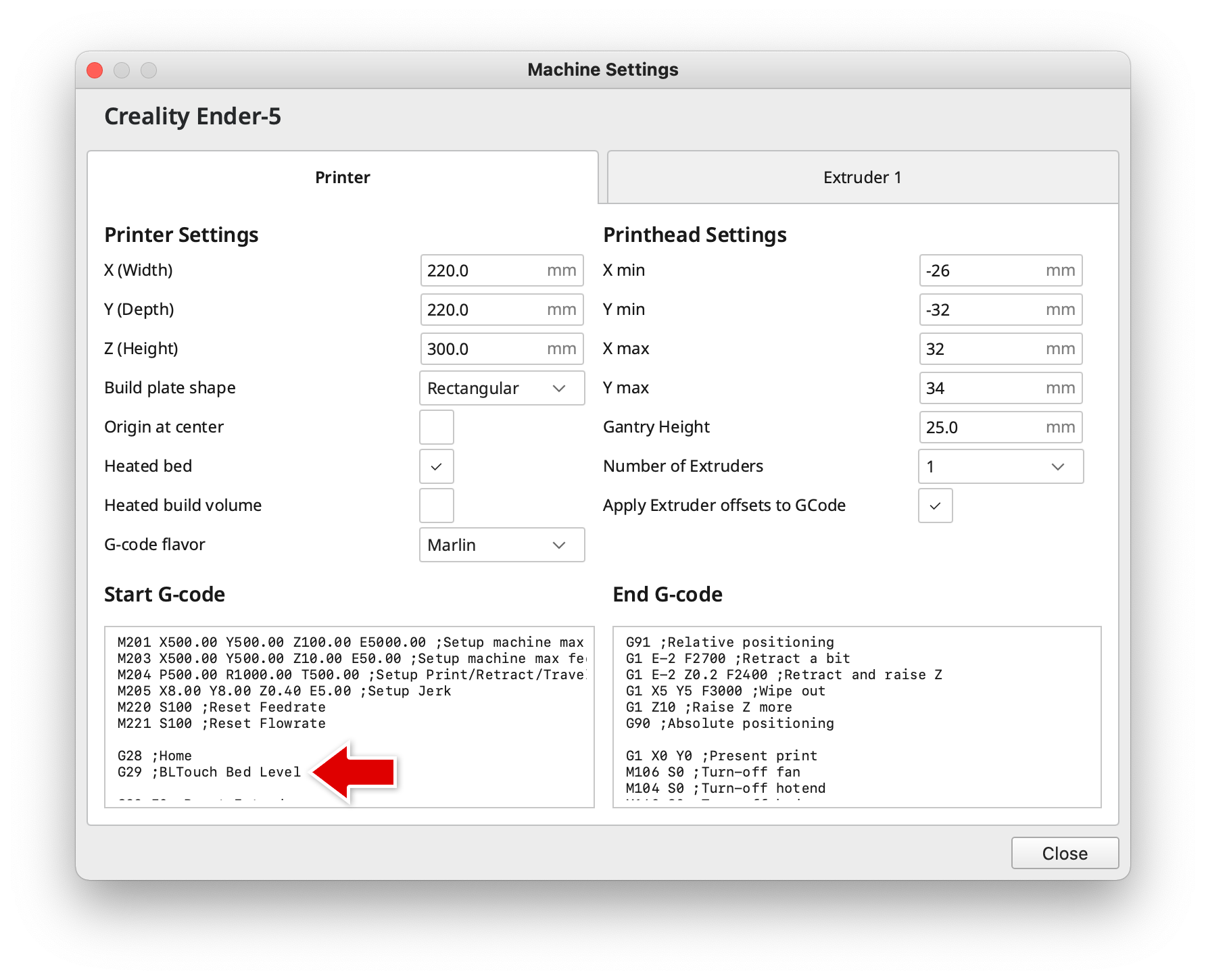
Resources
Guides
- Bed Leveling Guide
- 3D Printer Troubleshooting Guide - MatterHackers
- Print Quality Troubleshooting Guide - Simplify3d
- Ultimate 3D Printing Troubleshooting Guide - 3DSourced
3D Models
FDM Printers was last modified by Alexander Penney on May 13, 2025, 11:41 a.m.
- Be sure to download OrcaSlicer ONLY from this official source. Avoid "-orcaslicer.net-", "-orcaslicer.co-" and "-orca-slicer.com-" as these are unofficial and potentially malicious.